Membership Benefits
📢 New plans released
The new Kimi membership plans are now available, with pricing unchanged — see the Kimi Code plan page for plan details and pricing. For new members, the weekly quota limit is removed, and only the rolling 5-hour rate window remains. The Go tier has no coding quota; Plus and above can use Kimi Code. Existing subscribers on legacy plans are not affected: the tier name, quota rules, and auto-renewal all remain as they are. See the plan comparison below for the differences between the legacy and new plans.
Overview
Kimi Code is the developer-focused AI coding service within Kimi membership benefits, provided together with a Kimi membership subscription and sharing the same quota. Requests from the CLI, VS Code, Desktop, and third-party tools all count toward that quota.
See the Kimi membership page for tiers and pricing.
Membership Tiers
Kimi membership tiers have been renamed, with pricing unchanged. Here is how the new plans compare with the legacy ones:
| Item | Legacy plans | New plans |
|---|---|---|
| Kimi Code availability | Andante and above | Plus and above |
| 5-hour rate window | Yes | Yes |
| Weekly rate window | Yes | No |
| Monthly total quota | Yes | Yes |
| K3 access | Moderato and above | Plus and above |
| K3 1M context | Allegretto and above | Pro and above |
| HighSpeed access | Allegretto and above | Pro and above |
FAQ
Can I keep using my legacy plan?
Yes. Legacy plans purchased before the new plans launched remain usable. When the term ends, you can renew or upgrade to a new plan.
Do I have to upgrade to a new plan?
No — migration is optional. Your legacy plan keeps renewing as long as you stay subscribed; whether to upgrade depends on your needs.
How do I upgrade my plan?
On the Kimi Code plan page, pick the new plan you want and click "Subscribe" to complete payment. Your current plan's remaining days are prorated automatically, and the new plan takes effect immediately.
Quota and Limits
Quota rules differ between new and existing members:
- New members: the weekly quota limit is removed — quota no longer refreshes every 7 days. The rolling 5-hour rate window still applies: too many requests in a short time trigger rate limiting, which recovers automatically once the window rolls over.
- Existing members on legacy plans: rules are unchanged — quota refreshes automatically every 7 days from your subscription date, unused quota does not roll over, and the same 5-hour rolling rate window applies.
Both groups share the Kimi membership monthly total quota: if the monthly total is reached, Kimi Code quota is frozen until the monthly quota resets or you upgrade. Monthly usage can be viewed on the Subscription page.
All logged-in devices and API Keys share the same quota; devices inactive for over 30 days are automatically unbound and can be restored by running /login again. Log in to the Kimi Code Console at any time to check remaining quota and rate-limit status and to manage API Keys and devices.
Extra Usage
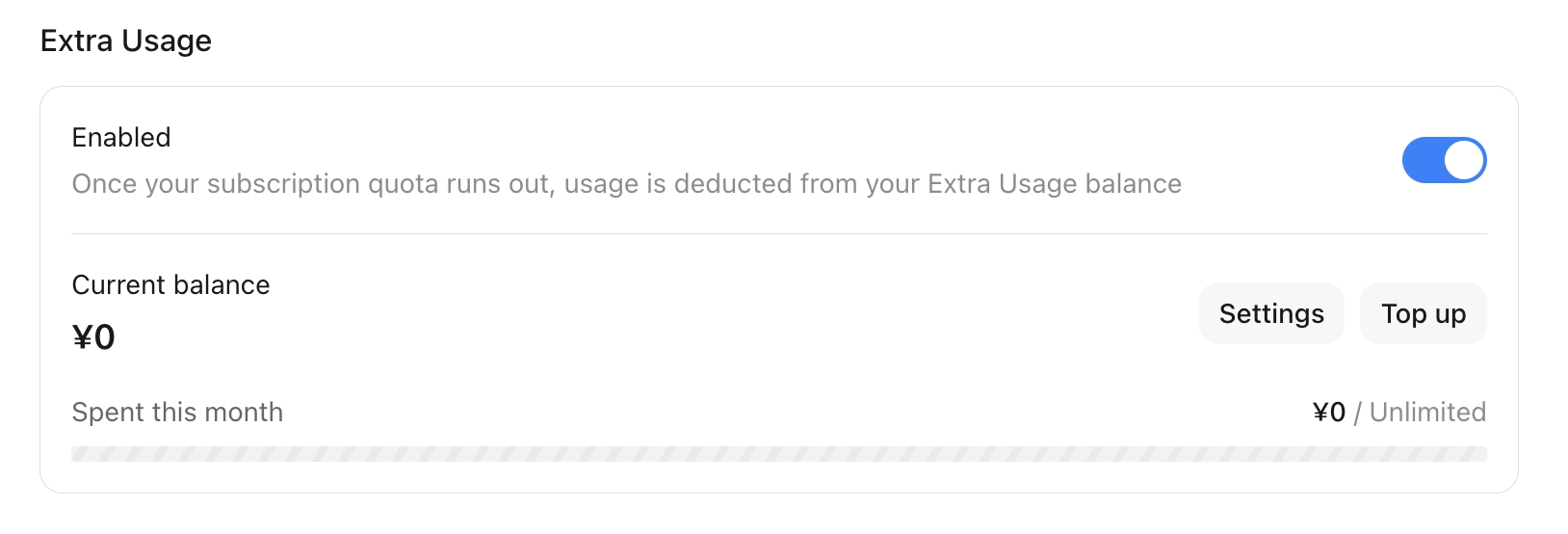
When your subscription quota runs out, you can keep making requests using your Extra Usage balance without waiting for a refresh. Only subscribed members can enable it, and Kimi on the web and Kimi Code share the same Extra Usage balance. See the full terms in the Extra Usage Agreement.
Top-up entry points
- From the main site: go to the Kimi Subscription page, scroll to the "Extra Usage" module at the bottom then choose an amount and complete payment.
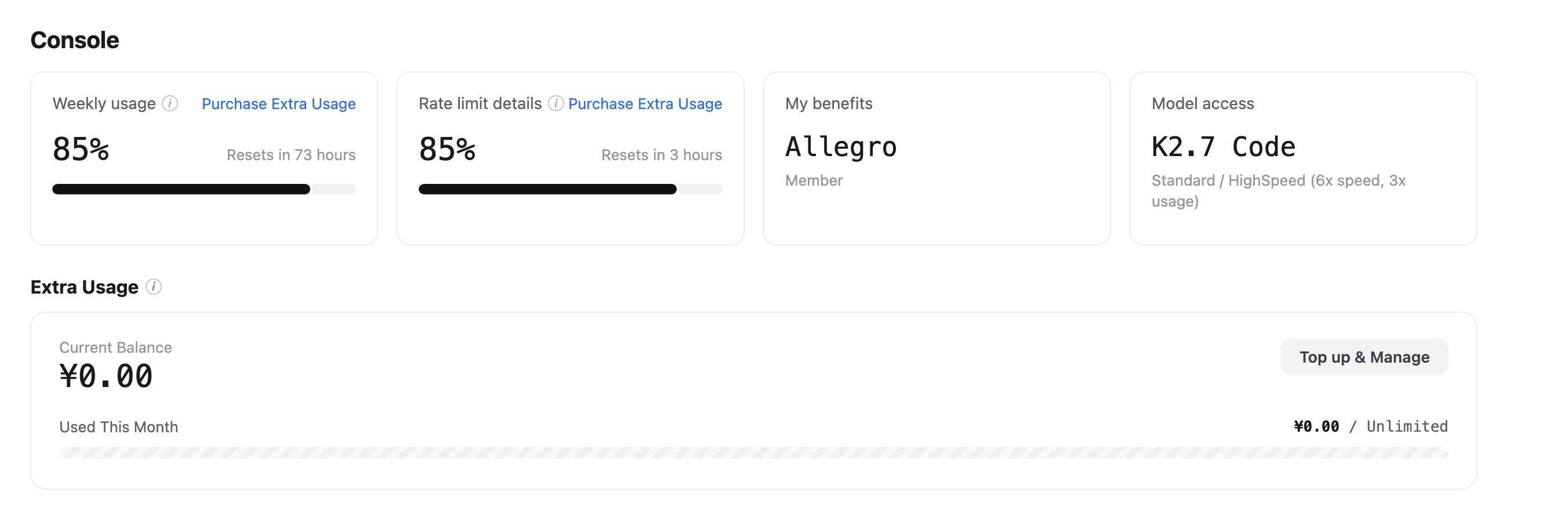
- From the Kimi Code Console: once your weekly quota (existing members on legacy plans) or 5-hour quota reaches over 80% used, the progress card shows a Buy Extra Usage button that takes you to the subscription page to purchase.
Enabling and managing
Turn on the "Extra Usage" toggle, and when your subscription quota runs out, the system automatically deducts from your Extra Usage balance. Click Settings in the module to enable a monthly spending cap and set the maximum you can spend this month; the progress bar shows this month's Extra Usage consumption in real time.
Billing and rules
- Billing: charged by actual usage — the more content read and generated, and the more complex the task, the higher the cost; the balance is shown in RMB, with rates as displayed on the platform. Extra Usage pricing is close to the official API pricing of the Kimi Open Platform; for heavy usage, upgrading your subscription is usually more cost-effective.
- Deduction priority: time-limited quotas such as the subscription are deducted first; Extra Usage is deducted last as a fallback. Once enabled, even if your subscription quota is maxed out, Extra Usage is consumed seamlessly and tasks don't stop or error out.
- Spending cap: enable a "monthly spending cap" in settings to limit how much Extra Usage can be spent this month; without it, there is no cap.
- Validity and stacking: the balance does not expire and stacks across top-ups; it remains usable after the subscription lapses, but you can't top up during the lapse — re-subscribe first to top up again.
- Refunds: generally non-refundable, non-transferable, and non-redeemable.
Billing example (from official examples, for a rough sense of scale; actual rates per the platform): a simple request (e.g. "recommend a rock song") costs about ¥0.03; a complex multi-step task (e.g. "plan a week-long road trip from Chengdu to western Sichuan") costs about ¥1.6.
Top-up limits: minimum ¥25 per top-up, up to 10 times and ¥3,000 per day, with a balance cap of ¥10,000.
Checking your usage
- Kimi web / app: Settings → Subscription & Invoices → My Quota.
- Kimi Code Console: once Extra Usage is enabled, log in to the Console to view your balance and usage.
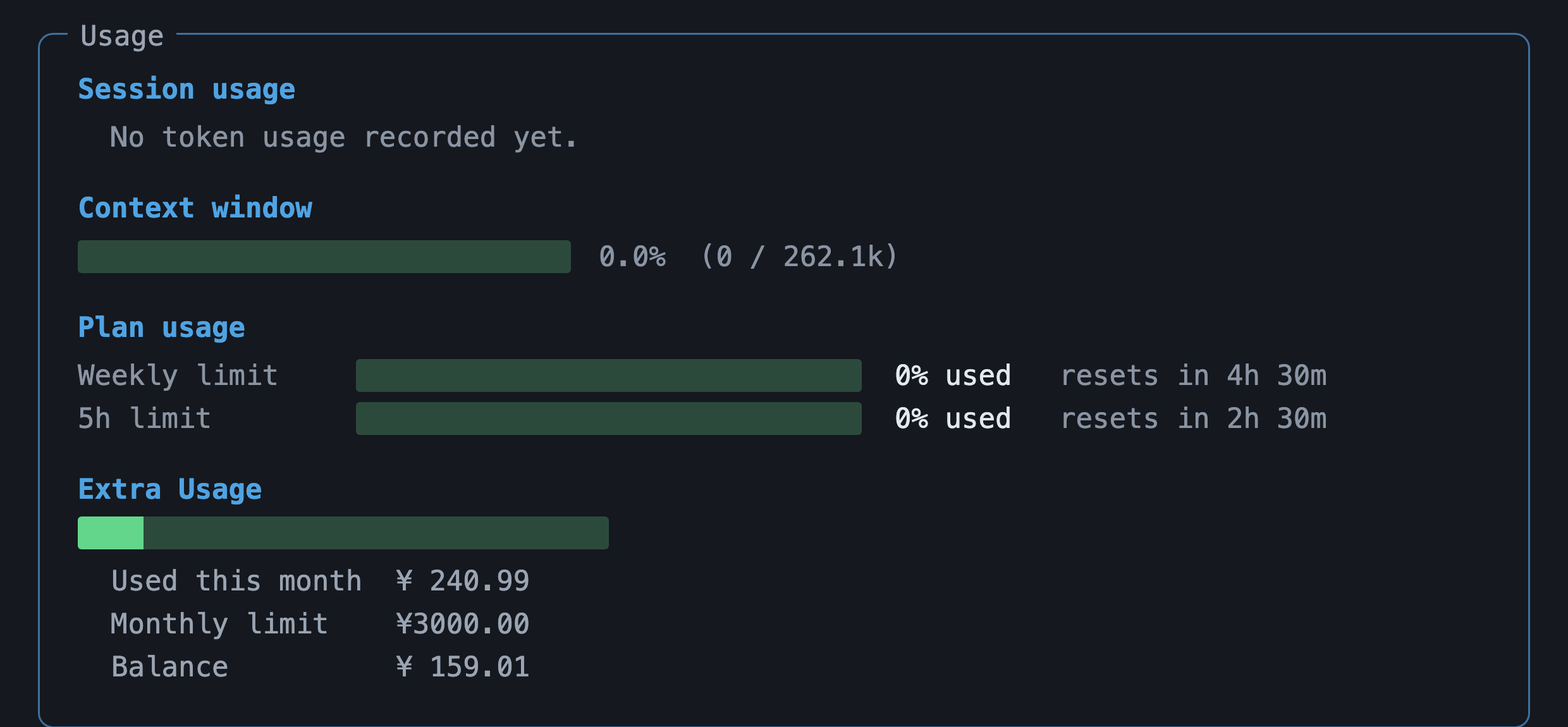
- Kimi Code CLI: type
/usageon the command line to check directly.
FAQ
Do Kimi on the web and Kimi Code use the same Extra Usage wallet?
Yes. The Extra Usage balance is shared between Kimi and Kimi Code — top up once and use it in both; the Extra Usage you top up under "My Quota" and the one in the Kimi Code Console are the same balance.
Which is deducted first, Extra Usage or subscription quota?
Time-limited quotas such as the subscription are deducted first; Extra Usage is only deducted as a fallback once all time-limited quotas are exhausted.
When I hit the monthly / weekly (legacy plans) / hourly limit, or get rate-limited mid-session, can I keep going?
Yes. Once Extra Usage is enabled you're not affected by subscription limits — whenever any quota is reached it seamlessly switches to the Extra Usage balance, so tasks don't stop or error out, and only Extra Usage is deducted without affecting your membership quota refresh.
How is Extra Usage billed, and how does it compare with a same-priced subscription or Open Platform API?
Billing depends on the request's input/output volume and cache hit rate; Extra Usage pricing is close to the Kimi Open Platform's official API, and for heavy usage upgrading your subscription is usually more cost-effective.
Can unused balance roll over to next month, and does it stack?
Yes — it's credit-based, doesn't expire, and stacks; it stays usable after the subscription lapses, but you can't top up during the lapse and must re-subscribe to top up again.
When the balance is nearly used up (e.g. a 25 RMB top-up), will the current request finish?
It guarantees the "last model call" completes even if its billing exceeds the limit, but it doesn't guarantee the whole task will finish.
Is Extra Usage available for Enterprise?
Not yet supported.
After I close my account, is the balance refunded?
To request a refund, go to Kimi.ai on the web, click your profile picture in the bottom-left corner, then select Get Help → User Feedback to reach our support team.
Next steps
- Model configuration — models, context windows, and switching methods available for each tier
- Error reference — how to handle errors such as quota exhaustion and insufficient permissions